 Reading & focusFree Chrome extension
Font Changer — Font Size & Dyslexia Font
Make any website readable: your font, your size, your spacing — remembered per site.
Verdana, Georgia, system UI, monospace or a dyslexia-friendly font; live preview, applied only where you set it.
Add to Chrome — it's freeOfficial site →
- Free to try
- No account
- Works locally
- 52+ languages
Works in Chrome, Edge, Brave and Opera
What you get
Verdana, Georgia, system UI, monospace or a dyslexia-friendly font; live preview, applied only where you set it.
- Pick a font per site, including OpenDyslexic or Atkinson Hyperlegible when installed.
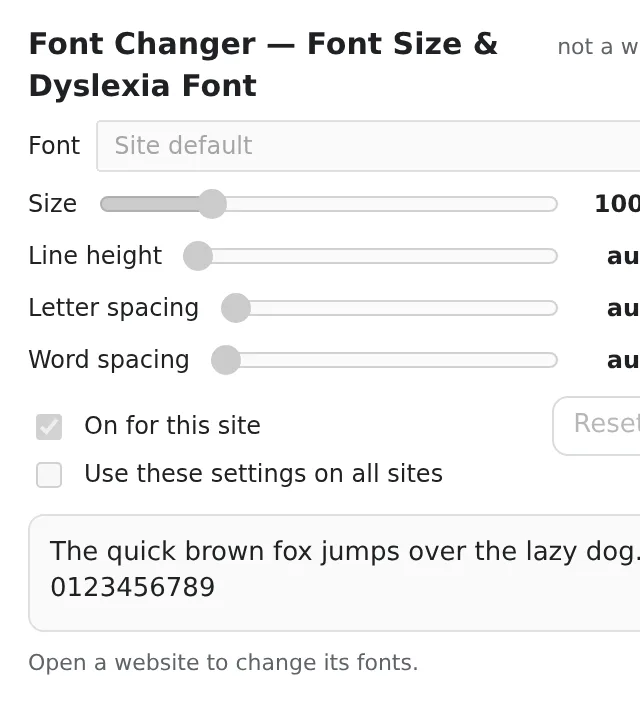
- Size, line height, letter and word spacing — changes apply live.
- Settings stick per site; untouched sites stay exactly as designed.
- No tracking, no network — just CSS applied in your browser.
How to use Font Changer — Font Size & Dyslexia Font
- Open a site that's hard to read and click the icon.
- Choose a font and adjust size and spacing while watching the page.
- Done — it's remembered for that site.
When it comes in handy
- Tiny thin fonts on news and documentation sites.
- Dyslexia, low vision or just tired eyes in the evening.
- Code and tables in a monospace font where the site didn't bother.
Free and Pro
Every extension has a free tier that does the job. No trial clock, no card.
$5.49/month$35.79/year$49.99 once, forever
Cancel anytime. Prices are shown in USD; local currencies at checkout.
Questions
Will it break site layouts?
Rarely; icon fonts are left alone, and you can reset a site in one click.
Does it change every site?
No — only the sites you configure; everything else stays untouched.
Is Font Changer — Font Size & Dyslexia Font free?
Yes — the free tier covers 3 files per installation with every feature. If you need more, Pro removes the limit; one Pro works in all our extensions.
What is Pro?
A single optional subscription ($5.49/month, $35.79/year or $49.99 once) that removes the free limits in every extension of the collection. You only see it when you hit a limit.
Does it collect or send my data?
It works inside the pages you open, in your browser; there is no account and no analytics. The permissions above are the full list.
Does it work in Edge, Brave, Opera?
Yes, any Chromium browser installs extensions from the Chrome Web Store.
Technical details and permissions
The extension asks only for what the feature needs:
| Permission | Why |
|---|---|
storage | Remember your settings locally. |
identity | |
Site access | The extension needs access to pages to do its job (see the table); it does not send page content anywhere. |
Open a site, pick a font (Verdana, Arial, Georgia, Comic Sans, OpenDyslexic / Atkinson Hyperlegible when installed, system UI, monospace), adjust size, line height, letter and word spacing — changes apply live and are remembered for that host. A content script is registered only for configured hosts (chrome.scripting.registerContentScripts) and injects one <style> with !important rules, skipping icon fonts and code blocks.
Permissions: storage (sync), scripting, activeTab; per-site host permissions are requested the first time you change a site (optional_host_permissions). No fonts are bundled, no network.