 Video & audioFree Chrome extension
Noise — White Noise & Background Sounds
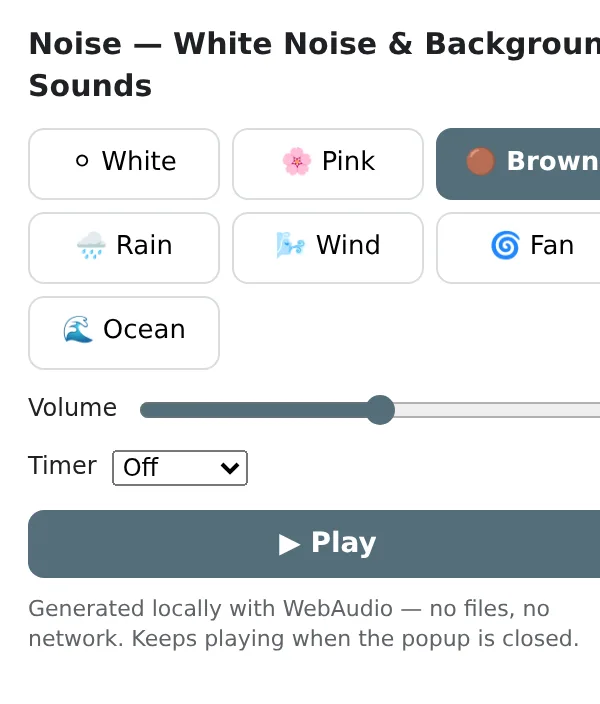
White, pink and brown noise, rain, wind, fan and ocean — for focus and sleep, with volume and a sleep timer.
Synthesised in your browser, so it keeps playing after you close the popup and needs no downloads.
Coming to the Chrome Web Store soon Meanwhile try Video Trimmer & CutterOfficial site →
Bookmark this page — the install button appears the day it is published.
- Free to try
- No account
- Works locally
- 52+ languages
Works in Chrome, Edge, Brave and Opera
What you get
Synthesised in your browser, so it keeps playing after you close the popup and needs no downloads.
- Seven sounds: white, pink, brown noise, rain, wind, fan, ocean.
- Volume and an optional sleep timer that fades out.
- Keeps playing in the background while you work or sleep.
- No files, no streaming, no account.
How to use Noise — White Noise & Background Sounds
- Click the icon and pick a sound.
- Set the volume and, at night, a timer.
- Close the popup — the sound keeps going.
When it comes in handy
- Masking an open-plan office.
- Falling asleep in a noisy flat or hotel.
- Calming a baby or a restless pet.
Free and Pro
Every extension has a free tier that does the job. No trial clock, no card.
$5.49/month$35.79/year$49.99 once, forever
Cancel anytime. Prices are shown in USD; local currencies at checkout.
Questions
Does it use the internet?
No — every sound is generated locally, so it works offline and never buffers.
Will it stop when I switch tabs?
No — it plays independently of tabs until you stop it or the timer ends.
Is Noise — White Noise & Background Sounds free?
Yes — the free tier covers 3 files per installation with every feature. If you need more, Pro removes the limit; one Pro works in all our extensions.
What is Pro?
A single optional subscription ($5.49/month, $35.79/year or $49.99 once) that removes the free limits in every extension of the collection. You only see it when you hit a limit.
Does it collect or send my data?
It works inside the pages you open, in your browser; there is no account and no analytics. The permissions above are the full list.
Does it work in Edge, Brave, Opera?
Yes, any Chromium browser installs extensions from the Chrome Web Store.
More in Video & audio

Technical details and permissions
The extension asks only for what the feature needs:
| Permission | Why |
|---|---|
storage | Remember your settings locally. |
offscreen | Process audio or images in a hidden page (a Manifest V3 requirement). |
alarms | Timers and schedules while the popup is closed. |
identity | |
Site access | The extension needs access to pages to do its job (see the table); it does not send page content anywhere. |
Click a sound — white, pink or brown noise, rain, wind, fan, ocean — set the volume and an optional sleep timer. Everything is synthesised with WebAudio (noise buffers, filters and slow LFOs) inside an offscreen document, so it keeps playing after the popup closes and the ZIP contains no audio files. The toolbar badge shows ♪ while playing.
Permissions: offscreen (audio playback needs a document), alarms (timer), storage, <all_urls> (while noise plays, every page shows a mini player — sound, time left, volume, stop — synced across tabs). No network.