 탭 및 생산성무료 Chrome 확장 프로그램
세계 시계 — 시간대
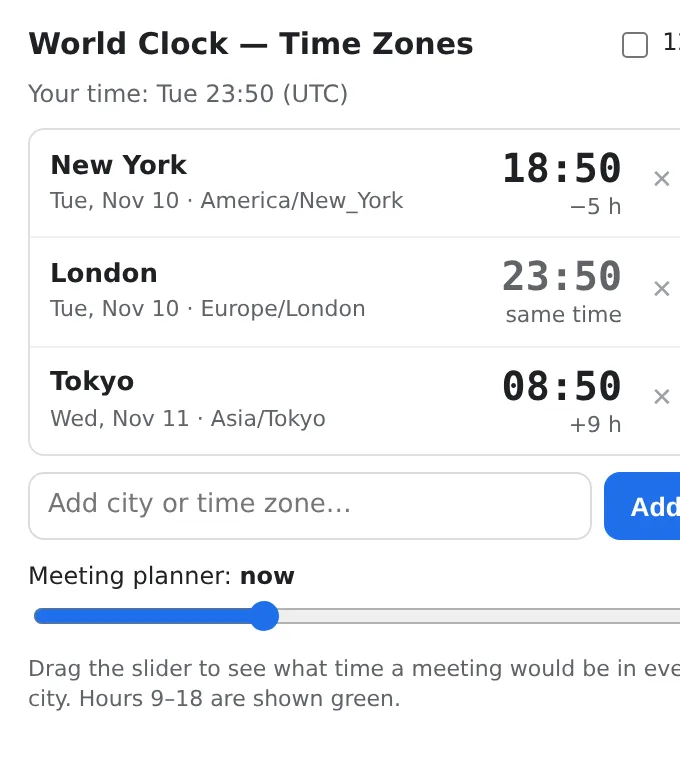
What time is it for your team in Berlin, Bangalore and Boston? One click, all your cities, working hours in green.
Add cities by name or time zone, 12/24-hour, day/night, and a meeting planner slider to find an hour that works for everyone.
- 무료 사용
- 계정 불필요
- 로컬에서 작동
- 52+ 언어
Chrome, Edge, Brave, Opera에서 작동
제공되는 기능
Add cities by name or time zone, 12/24-hour, day/night, and a meeting planner slider to find an hour that works for everyone.
- Current time, date and offset from you for every city you add.
- Working hours (9–18) in green, night in grey — read it at a glance.
- Drag the meeting planner: “+5 h from now” shown in every zone at once.
- Computed locally with the browser's time-zone data; no network.
세계 시계 — 시간대 사용 방법
- Click the icon and add your cities.
- Check times and offsets at a glance.
- Drag the planner slider to find a slot that suits everyone.
이럴 때 유용합니다
- Remote teams and clients across continents.
- Scheduling calls with family abroad.
- Catching a launch, match or deadline announced in another zone.
무료 및 Pro
모든 확장 프로그램은 기본 기능을 무료로 제공합니다. 체험 기간 제한이나 카드 등록이 없습니다.
월 $5.49연 $35.79$49.99 1회 결제, 평생 소장
언제든 취소 가능합니다. 가격은 USD 기준이며, 결제 시 현지 통화가 적용됩니다.
자주 묻는 질문
Does it handle daylight saving?
Yes — it uses the browser's IANA time-zone database, so DST changes are automatic.
Can I add a city it doesn't know?
Add it by its time zone (e.g. Europe/Lisbon) and give it any label you like.
세계 시계 — 시간대은(는) 무료인가요?
네, 무료 버전으로 모든 기능을 설치당 파일 3개까지 사용할 수 있습니다. 더 필요하다면 Pro로 제한을 해제하세요. 하나의 Pro로 모든 확장 프로그램을 이용할 수 있습니다.
Pro란 무엇인가요?
전체 컬렉션의 모든 확장 프로그램에서 무료 제한을 해제하는 단일 선택형 구독(월 $5.49, 연 $35.79 또는 1회 $49.99)입니다. 제한에 도달했을 때만 표시됩니다.
내 데이터를 수집하거나 전송하나요?
브라우저에서 연 페이지 내에서 작동합니다. 계정이나 분석 도구가 없습니다. 위의 권한이 전체 목록입니다.
Edge, Brave, Opera에서도 작동하나요?
네, Chromium 기반 브라우저라면 Chrome 웹 스토어에서 확장 프로그램을 설치할 수 있습니다.
탭 및 생산성의 다른 확장 프로그램



기술적 세부 정보 및 권한
이 확장 프로그램은 기능 작동에 필요한 권한만 요청합니다:
| 권한 | 이유 |
|---|---|
storage | 설정을 로컬에 저장합니다. |
identity | |
Site access | 기능을 수행하기 위해 페이지 접근 권한이 필요합니다(표 참조). 페이지 콘텐츠를 외부로 전송하지 않습니다. |