 タブ・仕事効率化無料のChrome拡張機能
世界時計 — タイムゾーン
What time is it for your team in Berlin, Bangalore and Boston? One click, all your cities, working hours in green.
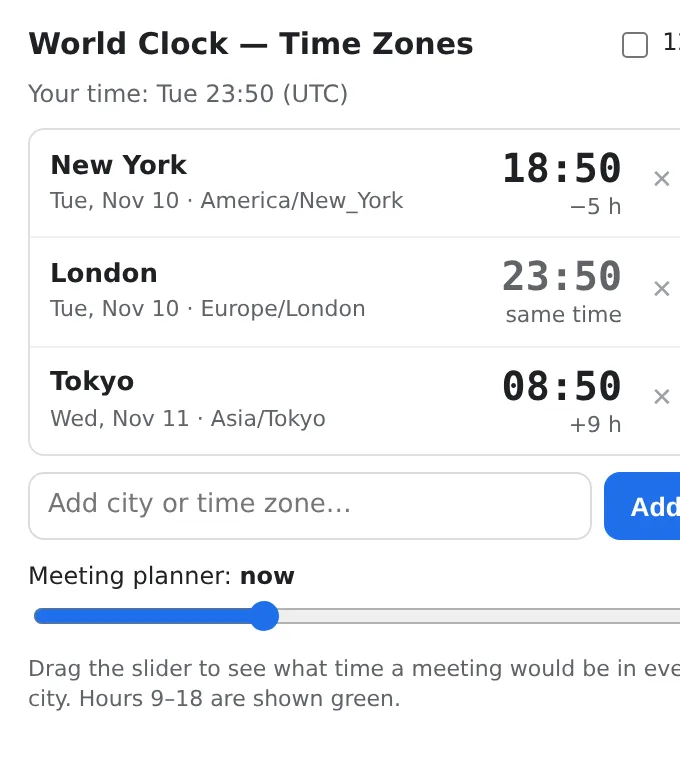
Add cities by name or time zone, 12/24-hour, day/night, and a meeting planner slider to find an hour that works for everyone.
- 無料で使える
- アカウント不要
- ローカルで動作
- 52+ 言語
Chrome、Edge、Brave、Operaで動作します
機能一覧
Add cities by name or time zone, 12/24-hour, day/night, and a meeting planner slider to find an hour that works for everyone.
- Current time, date and offset from you for every city you add.
- Working hours (9–18) in green, night in grey — read it at a glance.
- Drag the meeting planner: “+5 h from now” shown in every zone at once.
- Computed locally with the browser's time-zone data; no network.
世界時計 — タイムゾーン の使い方
- Click the icon and add your cities.
- Check times and offsets at a glance.
- Drag the planner slider to find a slot that suits everyone.
こんな時に便利
- Remote teams and clients across continents.
- Scheduling calls with family abroad.
- Catching a launch, match or deadline announced in another zone.
無料版とPro版
すべての拡張機能に実用的な無料プランがあります。試用期間の制限やクレジットカード登録はありません。
月額 $5.49年額 $35.79買い切り $49.99
いつでもキャンセル可能。価格は米ドルで表示されていますが、決済時には現地通貨が適用されます。
よくある質問
Does it handle daylight saving?
Yes — it uses the browser's IANA time-zone database, so DST changes are automatic.
Can I add a city it doesn't know?
Add it by its time zone (e.g. Europe/Lisbon) and give it any label you like.
世界時計 — タイムゾーン は無料ですか?
はい。無料プランではすべての機能が使え、インストールごとに 3 ファイルまで処理できます。さらに必要な場合は、Pro版で制限を解除できます。1つのPro版ですべての拡張機能が使い放題になります。
Pro版とは何ですか?
コレクション内のすべての拡張機能の制限を解除する、オプションのサブスクリプション(月額$5.49、年額$35.79、または買い切り$49.99)です。制限に達したときにのみ案内が表示されます。
データは収集または送信されますか?
ブラウザで開いたページ内で動作します。アカウント登録やアクセス解析はありません。上記の権限がすべてです。
Edge、Brave、Operaでも使えますか?
はい。Chromiumベースのブラウザであれば、Chromeウェブストアから拡張機能をインストールできます。
タブ・仕事効率化 のその他の拡張機能



技術的な詳細と権限
この拡張機能は、機能に必要な権限のみを要求します:
| 権限 | 理由 |
|---|---|
storage | 設定をローカルに保存します。 |
identity | |
Site access | 拡張機能が機能するためにはページへのアクセスが必要です(表を参照)。ページの内容を外部に送信することはありません。 |