 标签页与效率免费 Chrome 扩展
世界时钟 — 时区
What time is it for your team in Berlin, Bangalore and Boston? One click, all your cities, working hours in green.
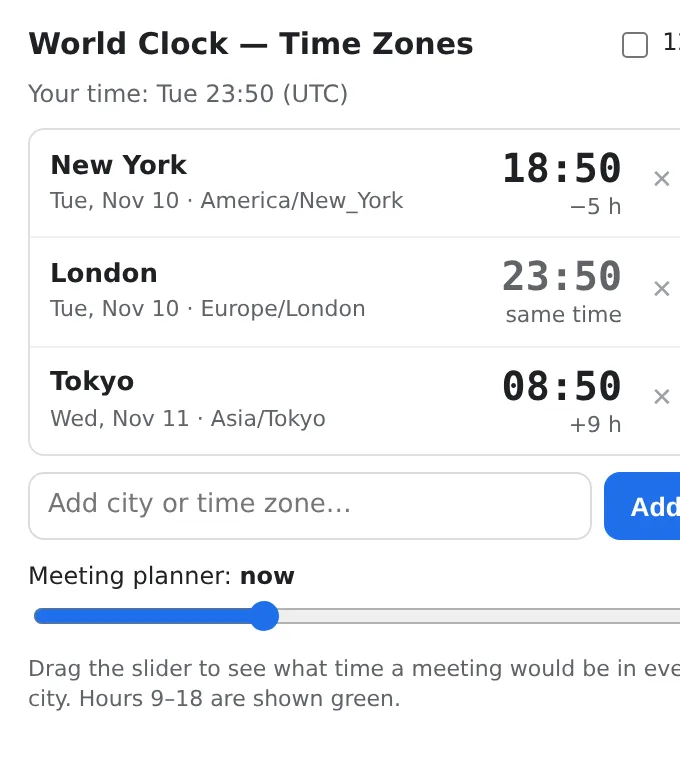
Add cities by name or time zone, 12/24-hour, day/night, and a meeting planner slider to find an hour that works for everyone.
- 免费可用
- 免注册
- 本地运行
- 52+ 语言
支持 Chrome、Edge、Brave 和 Opera 浏览器
功能特性
Add cities by name or time zone, 12/24-hour, day/night, and a meeting planner slider to find an hour that works for everyone.
- Current time, date and offset from you for every city you add.
- Working hours (9–18) in green, night in grey — read it at a glance.
- Drag the meeting planner: “+5 h from now” shown in every zone at once.
- Computed locally with the browser's time-zone data; no network.
如何使用 世界时钟 — 时区
- Click the icon and add your cities.
- Check times and offsets at a glance.
- Drag the planner slider to find a slot that suits everyone.
适用场景
- Remote teams and clients across continents.
- Scheduling calls with family abroad.
- Catching a launch, match or deadline announced in another zone.
免费版与 Pro 版
每款扩展都有能满足日常需求的免费额度。没有试用倒计时,无需绑定信用卡。
$5.49/月$35.79/年$49.99 终身买断
随时取消。价格以美元显示;结账时将转换为当地货币。
常见问题
Does it handle daylight saving?
Yes — it uses the browser's IANA time-zone database, so DST changes are automatic.
Can I add a city it doesn't know?
Add it by its time zone (e.g. Europe/Lisbon) and give it any label you like.
世界时钟 — 时区 是免费的吗?
是的 — 免费版包含所有功能,每次安装可处理 3 个文件。如果需要更多,Pro 可以解除限制;一份 Pro 订阅适用于我们所有的扩展。
什么是 Pro?
一份可选的订阅服务($5.49/月、$35.79/年或 $49.99 买断),可解除全站所有扩展的免费限制。只有当你达到免费额度上限时才会看到它。
它会收集或发送我的数据吗?
它直接在你的浏览器和打开的网页中运行;无需注册账号,也没有任何数据分析。以上就是完整的权限列表。
支持 Edge、Brave 或 Opera 浏览器吗?
支持,任何基于 Chromium 的浏览器都可以从 Chrome 网上应用店安装扩展。
更多 标签页与效率 扩展



技术细节与权限
本扩展仅申请实现功能所需的最低权限:
| 权限 | 用途 |
|---|---|
storage | 在本地保存你的设置。 |
identity | |
Site access | 扩展需要访问网页才能正常工作(见下表);它不会将网页内容发送到任何地方。 |