 分頁與生產力免費 Chrome 擴充功能
Pomodoro Timer — 專注計時器
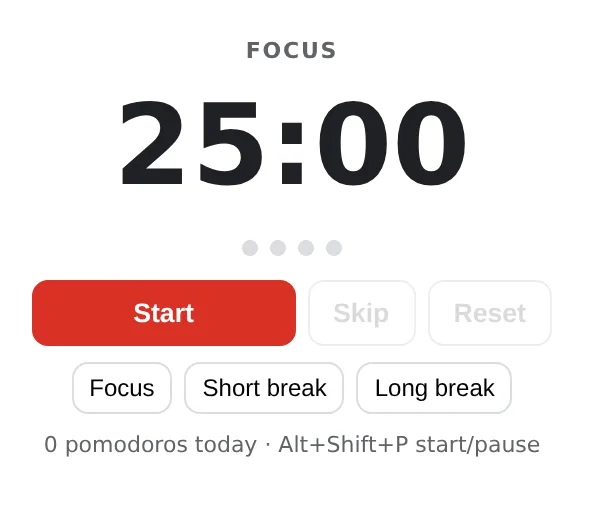
25 minutes of focus, 5 of rest — the countdown lives on your toolbar icon.
Chime and notification at each phase, long break every four, today's count in the popup. Works offline.
- 免費使用
- 免帳號
- 本機運作
- 52+ 語言
支援 Chrome、Edge、Brave 與 Opera
您將獲得
Chime and notification at each phase, long break every four, today's count in the popup. Works offline.
- Minutes left shown right on the icon — no tab to keep open.
- All lengths configurable; long break after four sessions.
- Notification plus a chime so you notice even in another window.
- Alt+Shift+P starts and pauses; daily stats stay on your device.
如何使用 Pomodoro Timer — 專注計時器
- Click the icon or press Alt+Shift+P to start a session.
- Work until the chime; take the break it offers.
- Check today's completed pomodoros in the popup.
適用情境
- Writing, studying or coding in blocks without checking the clock.
- Breaking a dreaded task into one 25-minute start.
- Remembering to actually stand up between sessions.
免費版與 Pro 版
每款擴充功能都有能滿足需求的免費方案。沒有試用期限制,免綁信用卡。
每月 $5.49每年 $35.79一次付費 $49.99,終身使用
隨時可取消。價格以 USD 顯示;結帳時將轉換為當地貨幣。
常見問題
Does the timer survive closing the popup?
Yes — it runs on browser alarms, so it keeps going even when Chrome suspends the extension.
Can I change 25/5?
Yes: focus, short and long break lengths and the cycle count are all adjustable.
Pomodoro Timer — 專注計時器 是免費的嗎?
是的 — 免費方案包含所有功能,每次安裝可處理 3 個檔案。如果您需要更多,Pro 方案可解除限制;一個 Pro 方案適用於我們所有的擴充功能。
什麼是 Pro?
單一的選購訂閱方案(每月 $5.49、每年 $35.79 或一次性付費 $49.99),可解除全套系列中所有擴充功能的免費限制。只有在您達到限制時才會看到升級提示。
它會收集或傳送我的資料嗎?
它在您開啟的網頁和瀏覽器內運作;無需帳號,也沒有資料分析。上述權限即為完整清單。
支援 Edge、Brave 或 Opera 嗎?
支援,任何 Chromium 核心的瀏覽器都能從 Chrome 線上應用程式商店安裝擴充功能。
分頁與生產力 的更多工具



技術細節與權限
此擴充功能只會要求必要權限:
| 權限 | 原因 |
|---|---|
storage | 在本機記住您的設定。 |
alarms | 在彈出視窗關閉時執行計時器與排程。 |
notifications | 您啟用的桌面通知。 |
offscreen | 在隱藏頁面中處理音訊或圖片(Manifest V3 的規定)。 |
identity | |
Site access | 擴充功能需要存取網頁才能運作(請見表格);它不會將網頁內容傳送到任何地方。 |