 タブ・仕事効率化無料のChrome拡張機能
Pomodoro Timer — 集中タイマー
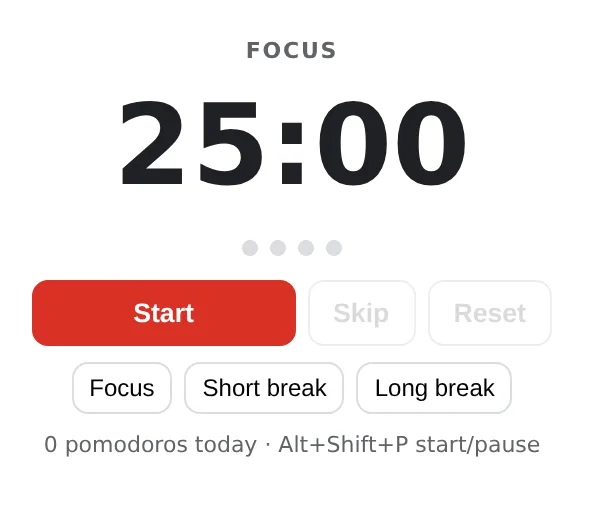
25 minutes of focus, 5 of rest — the countdown lives on your toolbar icon.
Chime and notification at each phase, long break every four, today's count in the popup. Works offline.
- 無料で使える
- アカウント不要
- ローカルで動作
- 52+ 言語
Chrome、Edge、Brave、Operaで動作します
機能一覧
Chime and notification at each phase, long break every four, today's count in the popup. Works offline.
- Minutes left shown right on the icon — no tab to keep open.
- All lengths configurable; long break after four sessions.
- Notification plus a chime so you notice even in another window.
- Alt+Shift+P starts and pauses; daily stats stay on your device.
Pomodoro Timer — 集中タイマー の使い方
- Click the icon or press Alt+Shift+P to start a session.
- Work until the chime; take the break it offers.
- Check today's completed pomodoros in the popup.
こんな時に便利
- Writing, studying or coding in blocks without checking the clock.
- Breaking a dreaded task into one 25-minute start.
- Remembering to actually stand up between sessions.
無料版とPro版
すべての拡張機能に実用的な無料プランがあります。試用期間の制限やクレジットカード登録はありません。
月額 $5.49年額 $35.79買い切り $49.99
いつでもキャンセル可能。価格は米ドルで表示されていますが、決済時には現地通貨が適用されます。
よくある質問
Does the timer survive closing the popup?
Yes — it runs on browser alarms, so it keeps going even when Chrome suspends the extension.
Can I change 25/5?
Yes: focus, short and long break lengths and the cycle count are all adjustable.
Pomodoro Timer — 集中タイマー は無料ですか?
はい。無料プランではすべての機能が使え、インストールごとに 3 ファイルまで処理できます。さらに必要な場合は、Pro版で制限を解除できます。1つのPro版ですべての拡張機能が使い放題になります。
Pro版とは何ですか?
コレクション内のすべての拡張機能の制限を解除する、オプションのサブスクリプション(月額$5.49、年額$35.79、または買い切り$49.99)です。制限に達したときにのみ案内が表示されます。
データは収集または送信されますか?
ブラウザで開いたページ内で動作します。アカウント登録やアクセス解析はありません。上記の権限がすべてです。
Edge、Brave、Operaでも使えますか?
はい。Chromiumベースのブラウザであれば、Chromeウェブストアから拡張機能をインストールできます。
タブ・仕事効率化 のその他の拡張機能



技術的な詳細と権限
この拡張機能は、機能に必要な権限のみを要求します:
| 権限 | 理由 |
|---|---|
storage | 設定をローカルに保存します。 |
alarms | ポップアップが閉じている間のタイマーとスケジュール機能です。 |
notifications | 有効にしたデスクトップ通知を表示します。 |
offscreen | バックグラウンドの非表示ページで音声や画像を処理します(Manifest V3の要件)。 |
identity | |
Site access | 拡張機能が機能するためにはページへのアクセスが必要です(表を参照)。ページの内容を外部に送信することはありません。 |